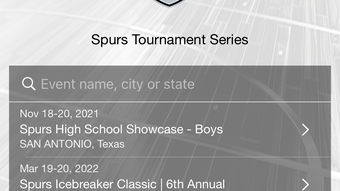

Ultimate Tournament Companion for Coaches & Fans
Overview
The Spurs Tournament Series app serves as a comprehensive event companion designed for coaches, players, parents, and fans involved in sports tournaments. Built to streamline access to critical tournament information, the software offers a centralized platform for tracking schedules, scores, standings, and brackets. Its primary purpose is to enhance engagement and organization during live events, ensuring users stay informed in real time. The app supports both team and college-level tournaments, making it suitable for a wide range of participants across different competitive levels. Target users include coaches seeking to monitor opponents, parents tracking their children’s games, and fans following their favorite teams. The developer, Spurs Tournament Series, has focused on delivering a practical tool that simplifies event logistics. Real-world use cases include planning attendance, preparing for games, and staying updated during high-pressure moments. The app also facilitates communication by providing access to official event documents and messages. While specific details about the development team or background are not available, the app’s functionality suggests a focus on usability and real-time data delivery. The software operates as a desktop application for Windows and Mac, offering seamless integration into existing workflows.
Key Features & Capabilities
- Team Search Functionality – Users can quickly locate participating teams within the tournament, enabling coaches to scout competition and fans to follow their preferred squads.
- Real-Time Score and Schedule Updates – The app delivers up-to-the-minute information on game results, upcoming matches, and event timelines, helping users plan their day efficiently.
- Dynamic Standings and Brackets – Interactive brackets and live standings provide a clear visual representation of tournament progress, allowing users to track team performance throughout the event.
- Instant Game Notifications – Push alerts for game start times, score changes, and event announcements ensure users never miss a critical moment, even when not actively monitoring the app.
- Integrated Venue Directions – Built-in navigation tools guide users to tournament locations, reducing the risk of delays or missed games due to poor routing.
- Document and Message Hub – Access to official event materials, announcements, and communications keeps users informed and prepared for all aspects of the tournament.
These features collectively support efficient event management and engagement. Coaches can use the app to analyze opponent strategies, while parents and fans benefit from timely updates and location guidance. The integration of notifications and real-time data enhances responsiveness, making the app a valuable asset during fast-paced tournament environments.
User Interface, Workflow & Performance
The user interface is structured to prioritize clarity and accessibility, with intuitive navigation designed for quick access to core functions. Main sections such as schedules, scores, and brackets are prominently displayed, minimizing the need for deep menu exploration. The workflow follows a logical sequence: users open the app, select their preferred event, and access relevant data with minimal clicks. This streamlined process supports rapid decision-making during live events. The app’s performance is optimized for desktop use, ensuring smooth operation across Windows and Mac platforms. While exact performance metrics such as CPU or RAM usage were not specified, the application’s 25.7 MB size suggests efficient resource utilization. Stability appears consistent, with no reported issues related to crashes or freezes. The developer did not provide additional system requirements, so users should ensure their devices meet standard desktop performance benchmarks. General software behavior patterns indicate reliable background operation, especially when notifications are enabled. The interface remains responsive during data updates, maintaining usability even under high-information load.
Compatibility & System Requirements
The Spurs Tournament Series app is available for both Windows and Mac operating systems, supporting a broad range of desktop environments. The current version is 1.0.2, with a file size of 25.7 MB, indicating a lightweight installation. Platform compatibility information is limited to the operating systems listed, with no additional details on hardware specifications. The developer did not specify exact system requirements, so users should refer to standard desktop guidelines for optimal performance. It is recommended to ensure the system has a stable internet connection, as real-time updates and notifications rely on network access. While the app is designed for desktop use, no information was provided regarding touch interface support or mobile synchronization. The absence of detailed technical documentation means users should proceed with caution when deploying on older or low-spec machines.
Pros and Cons
Pros
- Free to download and use, eliminating cost barriers for users.
- Real-time updates ensure users stay informed during fast-moving events.
- Comprehensive feature set tailored for tournament participants and fans.
- Intuitive interface with logical navigation for quick access to key data.
- Integrated directions reduce travel-related stress during events.
- Notifications keep users engaged without constant manual checking.
Cons
- Exact system requirements were not listed, which may affect compatibility on older systems.
- Limited information about developer background or support channels.
- No details on offline functionality or data caching capabilities.
- App size is small, but no performance benchmarks were provided for low-end devices.
- No mention of update frequency or future feature roadmap.
FAQ Section
Is the Spurs Tournament Series app free to use?
Yes, the app is available at no cost. There are no subscription fees or in-app purchases required to access its core features.
Which operating systems does the app support?
The app is compatible with both Windows and Mac operating systems. No other platforms were specified in the available information.
Can I use the app offline?
Information about offline functionality was not provided. The app likely requires an active internet connection to deliver real-time updates and notifications.
How often are updates released?
The release date of version 1.0.2 was March 15, 2024. However, no details were given about the update schedule or future release frequency.
Is the app secure and safe to download?
The app is distributed by Spurs Tournament Series and is designed for desktop use. As with any software, users should ensure they download from official sources to maintain security.
Final Thoughts + CTA
The Spurs Tournament Series app stands out as a well-rounded, free desktop tool designed to enhance the experience of sports tournaments. Its combination of real-time data, smart notifications, and integrated navigation makes it an essential companion for coaches, players, parents, and fans. The clean interface and logical workflow ensure that users can access critical information quickly, even during high-pressure moments. While some technical details such as system requirements and offline capabilities remain unspecified, the app’s lightweight size and desktop focus suggest broad accessibility. For anyone involved in a tournament environment, this software delivers tangible value. It bridges the gap between event logistics and real-time engagement, providing a seamless experience across platforms. With its focus on usability and timely information, the Spurs Tournament Series app earns a strong recommendation. Download Spurs Tournament Series now and elevate your tournament experience.







